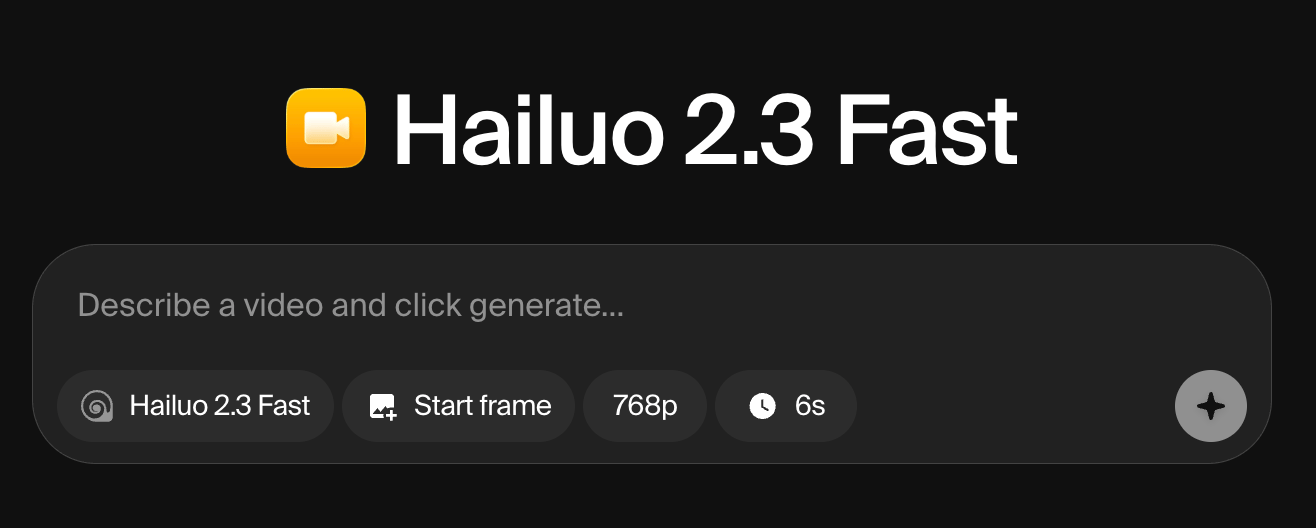
There are three ways you can create video with Krea:
- Type a prompt and get a video (text‑to‑video).
- Take a still image and animate it (image‑to‑video).
- Extend existing clips to build longer scenes.
AI generates only short clips (5–12 seconds). Videos take longer to create (1–10 minutes), use 1,000+ compute credits (vs. 30–100 for images), and produce one video per prompt (vs. 2–4 images).
- Frame generation: Quality and detail of individual frames
- Motion consistency: Smoothness and stability of movement across frames
- Character retention: Ability to maintain character appearance and identity throughout the video
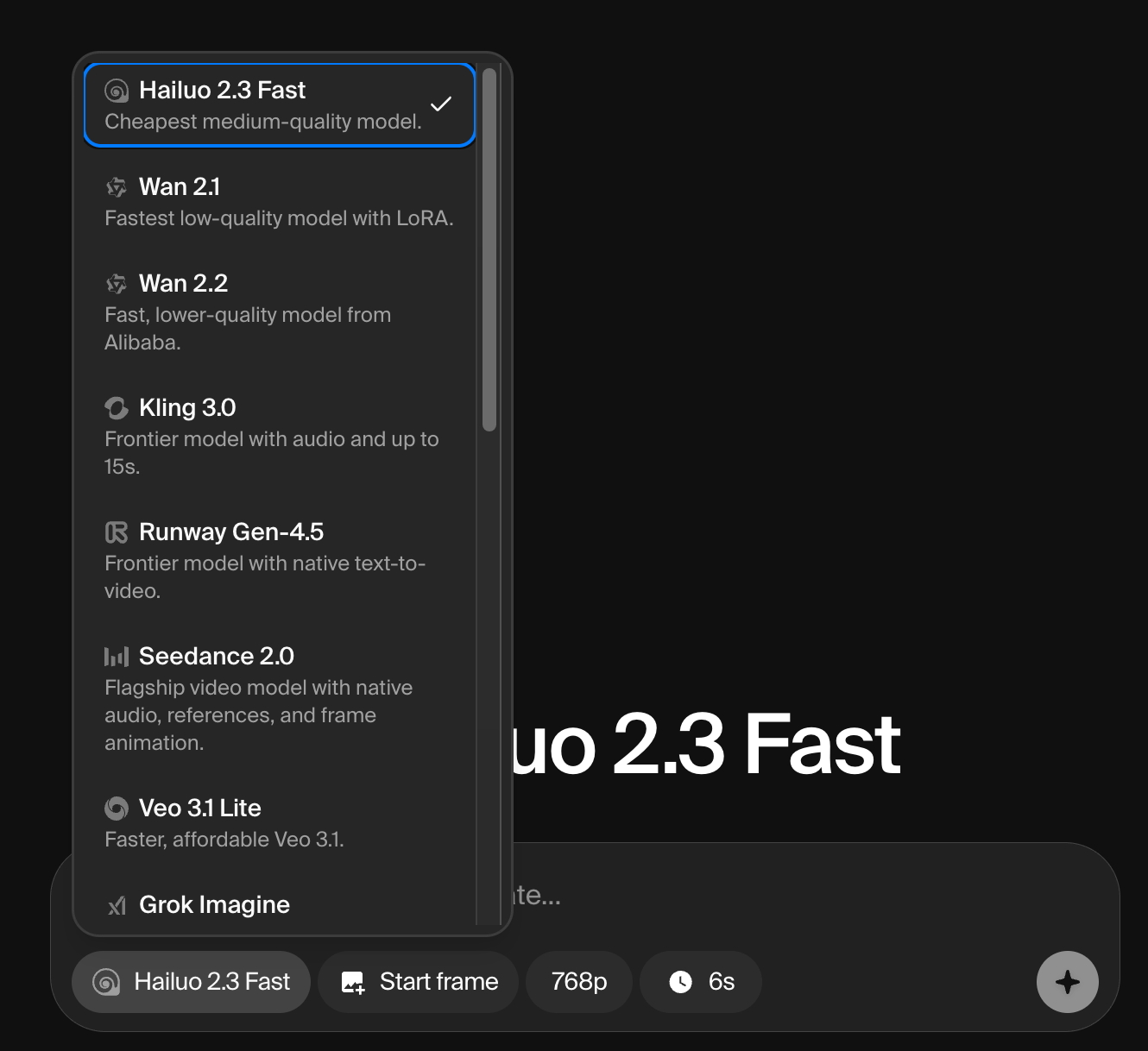
See a full overview of video models available on Krea.
Video generation
When you open the Video page, you’ll see three main areas:
- Center panel: The prompt box where you write your text prompt, adjust settings, and click Generate
- Left panel: Your previous sessions with all earlier video generations
- Bottom-left corner: The model picker to switch between Krea’s video generation models
Video Generation Settings
Like our image generation tool, you’ll find settings below the prompt box. Note: Not all models support all settings.
| Setting | What it does |
|---|
| Aspect ratio | Choose portrait or landscape dimensions |
| Duration | Set clip length (e.g., 6s or 12s) |
| Resolution | Set video quality (e.g., 720p or 1080p) |
| Start image | Define where the video begins |
| End image | Define where the video ends |
Shorter, lower-resolution videos use fewer compute credits.
Extending Videos
Individual video clips max out at 12 seconds, but you can extend them with additional generations. The AI uses the final frame (plus preceding video context) to generate more footage seamlessly.
To extend a video:
- Hover over a previously generated clip
- Click Extend
- Adjust your prompt if needed and generate again
Best Practices for Video Models
Model Selection
- Test multiple models with the same prompt to find the best fit for your desired style
- Choose the right model for your goal:
- Character-driven animations: Use Hailuo for its superior character retention
- Dynamic camera movements: Try Runway for better perspective shifts
Workflow Tips
- Start short: Generate 5–10 second clips first to test ideas before committing to longer animations
- Use keyframes strategically: Longer keyframe sequences help the AI understand motion better
- Pre-render complex scenes: Generate frames separately before animating to ensure consistency
- Be specific with prompts: Include detailed motion descriptions (e.g., “camera pans left,” “character walks smoothly”) for better results
Animation generation
Hailuo 2.3 is the best model for animation on Krea, especially for 2D animation, cartoon styles, andanime. It delivers smooth stylized motion, keeps characters consistent across frames, and uses fewer credits (750 units) than most top models.
Step-by-Step Guide
1. Select the Model
- Go to the Video page
- In the bottom-left corner, click the model picker
- Choose Hailuo 2.3
2. Upload a Start Frame (Image-to-Video)
Upload your illustration, character design, or photo. This is how Hailuo knows what to animate.
3. Write Your Prompt
Describe the motion you want. Example prompt:
"2D anime character walking smoothly across screen, camera pans left to right, clean line art, fluid animation, bright colors"
This helps Hailuo understand both your visual style and the movement you want.
4. Adjust Settings
- Duration: 6s for loops, 10s for extended clips
- Aspect ratio:
- 9:16 for Reels/TikTok
- 16:9 for YouTube
- End frame (optional): Add one to guide where the animation lands: great for loops or landing on a specific shot
5. Generate & Extend
Click Generate, then hover over your clip and click Extend if you need longer sequences.
Models at a Glance
| Category | Model Name | Speed | Credit Use |
|---|
| Fast | Krea Realtime | 3/3 | 10 |
| Fast | Hailuo 2.3 Fast | 3/3 | ~150 |
| Fast | Veo 3.1 Lite | 3/3 | ~300 |
| Fast | Grok Imagine | 3/3 | ~250 |
| Fast | LTX-2 | 3/3 | ~200 |
| Fast | Seedance Pro Fast | 3/3 | ~40 |
| Intelligent | Kling 3.0 | 2/3 | ~1000 |
| Intelligent | Runway Gen-4.5 | 2/3 | ~500 |
| Intelligent | Kling o3 | 2/3 | ~250 |
| Intelligent | Kling o3 Pro | 2/3 | ~350 |
| Intelligent | Kling o3 Reference | 2/3 | ~350 |
| Intelligent | Kling o3 Edit | 2/3 | ~350 |
| Intelligent | Sora 2 | 1/3 | ~300 |
| Intelligent | Sora 2 Pro | 1/3 | ~950 |
| Intelligent | Veo 3.1 | 2/3 | ~1300 |
| Intelligent | Veo 3.1 Fast | 3/3 | ~650 |
| Intelligent | Veo 3 | 2/3 | ~1300 |
| Intelligent | Veo 3 Fast | 3/3 | ~650 |
| Quality | Hailuo 2.3 | 2/3 | ~200 |
| Quality | Seedance 2.0 | 2/3 | ~300 |
| Quality | Seedance 1.5 Pro | 2/3 | ~400 |
| Quality | Kling o1 | 2/3 | ~450 |
| Quality | Wan 2.6 | 2/3 | ~300 |
| Quality | Wan 2.5 | 2/3 | ~400 |
| Quality | Kling 2.6 | 2/3 | ~300 |
| Quality | Kling 2.5 | 2/3 | ~300 |
| Quality | Kling 2.5 Turbo | 2/3 | ~300 |
| Quality | Vidu Q2 | 2/3 | ~150 |
| Quality | Vidu Q3 | 2/3 | ~600 |
| Quality | Hailuo 02 | 3/3 | ~80 |
| Legacy | Wan 2.1 | 3/3 | ~250 |
| Legacy | Wan 2.2 | 3/3 | ~300 |
| Legacy | Seedance Lite | 3/3 | ~150 |
| Legacy | Kling 2.1 | 3/3 | ~200 |
| Legacy | Veo 2 | 2/3 | ~2000 |
| Legacy | Runway Gen-4 | 2/3 | ~200 |
| Legacy | Runway Gen-3 | 2/3 | ~200 |
| Legacy | Kling 1.6 | 2/3 | ~150 |
| Legacy | Hunyuan | 3/3 | ~200 |
| Legacy | Kling 2.0 | 2/3 | ~1100 |
| Legacy | Hailuo | 2/3 | ~350 |
| Legacy | 01-Live | 2/3 | ~350 |
| Legacy | Ray 2 | 2/3 | ~300 |
| Legacy | Kling 1.0 (Pro) | 1/3 | ~300 |
| Legacy | Seedance Pro | 3/3 | ~200 |
Full Model Overview
Fast Models
| Model Name | Description | Speed | Quality | Credit Use |
|---|
| Krea Realtime | Real-time video generation model. Instant results at very low cost and quality. | 3/3 | 1/3 | 10 |
| Hailuo 2.3 Fast | Cheapest medium-quality model. Best for most use cases. | 3/3 | 2/3 | ~150 |
| Veo 3.1 Lite | Faster and more affordable version of the powerful Veo 3.1 model. | 3/3 | 2/3 | ~300 |
| Grok Imagine | Fast, high-quality video generation by xAI. | 3/3 | 3/3 | ~250 |
| LTX-2 | Affordable medium-quality audio-video model from Lightricks with native sound generation. | 3/3 | 2/3 | ~200 |
| Seedance Pro Fast | Fast and cheap model. Up to 12 seconds. | 3/3 | 2/3 | ~40 |
Intelligent Models
| Model Name | Description | Speed | Quality | Credit Use |
|---|
| Kling 3.0 | Latest frontier model from Kling with native audio and extended durations up to 15 seconds. | 2/3 | 3/3 | ~1000 |
| Runway Gen-4.5 | Latest frontier model from Runway with native text-to-video. | 2/3 | 3/3 | ~500 |
| Kling o3 | Advanced reasoning video model (720p). Supports image, element, and video references for precise creative control. | 2/3 | 3/3 | ~250 |
| Kling o3 Pro | Advanced reasoning video model (1080p). Supports image, element, and video references for precise creative control. | 2/3 | 3/3 | ~350 |
| Kling o3 Reference | Generates new shots guided by an input reference video, preserving cinematic language such as motion and camera. | 2/3 | 3/3 | ~350 |
| Kling o3 Edit | Edit videos directly using Kling o3. Describe changes in text and optionally add image or element references. | 2/3 | 3/3 | ~350 |
| Sora 2 | OpenAI’s new powerful video model. Rich world knowledge with very stable structure. | 1/3 | 3/3 | ~300 |
| Sora 2 Pro | OpenAI’s most advanced intelligent video generation model. | 1/3 | 3/3 | ~950 |
| Veo 3.1 | Best video model. Highest-quality frontier model with audio and reference images. | 2/3 | 3/3 | ~1300 |
| Veo 3.1 Fast | Faster and more affordable version of the powerful Veo 3.1 model with audio. | 3/3 | 3/3 | ~650 |
| Veo 3 | Older version of the highest-quality frontier model Veo 3.1. | 2/3 | 3/3 | ~1300 |
| Veo 3 Fast | Older, faster and more affordable version of the leading Veo 3 model with audio. | 3/3 | 3/3 | ~650 |
Quality Models
| Model Name | Description | Speed | Quality | Credit Use |
|---|
| Hailuo 2.3 | Frontier model with dynamic motion. | 2/3 | 3/3 | ~200 |
| Seedance 2.0 | ByteDance frontier video model with cinematic motion, optional synchronized audio, tagged image/video/audio references. | 2/3 | 3/3 | ~300 |
| Seedance 1.5 Pro | Latest medium quality model from ByteDance with audio generation and end frame support. | 2/3 | 3/3 | ~400 |
| Kling o1 | Intelligent video model that thinks before generating. Supports image, element, and video references for precise control. | 2/3 | 3/3 | ~450 |
| Wan 2.6 | Medium-quality model from Alibaba with improved quality and multi-shot support. | 2/3 | 2/3 | ~300 |
| Wan 2.5 | Latest medium quality model from Alibaba. | 2/3 | 2/3 | ~400 |
| Kling 2.6 | Frontier model from Kling with native audio. Highest quality at a moderate price point. | 2/3 | 3/3 | ~300 |
| Kling 2.5 | Next-gen model with improved dynamics and enhanced style adaptation from Kling. | 2/3 | 3/3 | ~300 |
| Kling 2.5 Turbo | Top-tier text-to-video generation with unparalleled motion fluidity and cinematic visuals. | 2/3 | 3/3 | ~300 |
| Vidu Q2 | High-quality model with reference images support. | 2/3 | 3/3 | ~150 |
| Vidu Q3 | New model excelling at anime. | 2/3 | 3/3 | ~600 |
| Hailuo 02 | Frontier model with dynamic motion. | 3/3 | 2/3 | ~80 |
Legacy Models
| Model Name | Description | Speed | Quality | Credit Use |
|---|
| Wan 2.1 | Fastest low-quality model with video Lora support. | 3/3 | 1/3 | ~250 |
| Wan 2.2 | Fast, lower-quality model from Alibaba. | 3/3 | 1/3 | ~300 |
| Seedance Lite | Fast and affordable medium-quality model from ByteDance. | 3/3 | 2/3 | ~150 |
| Kling 2.1 | Frontier model with 1080p resolution. | 3/3 | 2/3 | ~200 |
| Veo 2 | Expensive high-quality model from Google. | 2/3 | 3/3 | ~2000 |
| Runway Gen-4 | Medium quality model with a focus on cinematic visuals but weaker structure and motion. | 2/3 | 2/3 | ~200 |
| Runway Gen-3 | Old generation cinematic model with higher consistency. | 2/3 | 2/3 | ~200 |
| Kling 1.6 | Previous generation high-quality model for complex scenes. | 2/3 | 3/3 | ~150 |
| Hunyuan | Fast, inexpensive model with live previews. | 3/3 | 2/3 | ~200 |
| Kling 2.0 | High-quality model with great aesthetics. | 2/3 | 3/3 | ~1100 |
| Hailuo | High-quality model with camera control. | 2/3 | 3/3 | ~350 |
| 01-Live | High-quality model for animating people. | 2/3 | 3/3 | ~350 |
| Ray 2 | Older medium model with natural motion from Luma Labs. | 2/3 | 2/3 | ~300 |
| Kling 1.0 (Pro) | Slow model with high control and 10s duration. | 1/3 | 3/3 | ~300 |
| Seedance Pro | Fast, high-quality model from ByteDance. | 3/3 | 3/3 | ~200 |